
Automated Transcription
How to Get the Most out of Automated Transcription
Want a quick transcription? TranscribeMe has created a transcription solution for your needs. Our Automated Transcription service is an automated speech recognition product that provides time stamping at every speaker turn. This service can be ordered through our Customer Portal.
When should I order my file using Automated Transcription?
Files that are good or high quality recorded audio, with speakers who are clear, not heavily accented, and speaking at an average pace are excellent candidates for Automated Transcription. The clearer the audio, the clearer the speech, the more accurate and higher quality transcript you will receive. You should be aware of these points though:
- Remember, the Machine will interpret every noise as a word, so it will not accurately transcribe speakers talking over persistent background noise, or each other. The accuracy will also diminish if your recording sounds like the speakers are echoing, or there is a continual low-level hum throughout the recording. (Echoing speech is caused by recording in open areas with poor acoustics. Hums throughout the recording are the microphones picking up the sound of the machinery used to make the recording as it is operating.)
- Extremely long files will also benefit from Automated Transcription, as there is no delay in having the file transcribed. Just remember, it usually takes between 3 to 5 times the length of the audio for the transcript to finish. So if you have a 4 hour file, it could take up to 20 hours to receive your transcript back. Whereas human transcription will often take 12 to 15 days for a 4 hour file.
- Our Automated Transcription often returns some of the highest accuracy results in the business. Up to 95% for high quality audio. In an industry where between 80 to 85% accuracy is the norm, that makes TranscribeMe one of the industry leading providers.
- If your recording audio is not quite clear, you have multiple speakers who have been recorded at different levels, have heavy accents, or are continually talking over each other, we recommend going with one of our human transcription services. But if you have crisp, clear audio and you want the transcript back quickly and at a low price, Automated Transcription is for you.
How do I Order Automated Transcription?
To place your order, please log in to your account here.

Once logged in, you will have to upload the files you wish to have transcribed, if you haven't used the Direct Order process. You will see a green 'Upload Files' button in the top right hand of your screen.

A Navigation window will open, allowing you to select the files you want to upload to your portal for transcription.
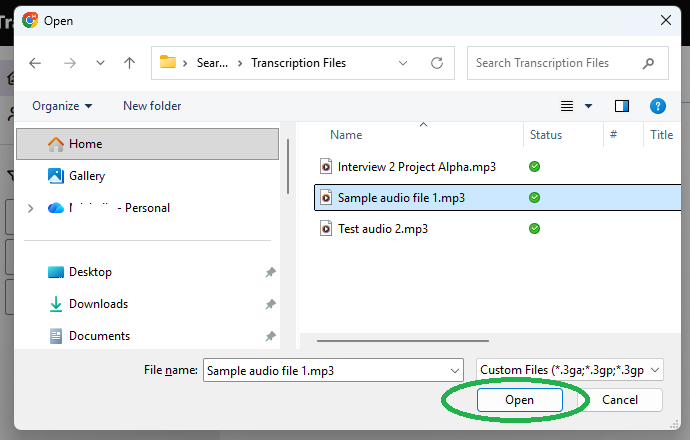
Once the file or files have finished uploading you will see a pop up window listing your files. This pop up window will have the title 'Ready to Transcribe,' at the top. If you have already uploaded files to your customer portal that you want to transcribe, you can get to this same point by clicking the box to the left of the file name of any file that has 'Ready to Transcribe' as it's status. When you click that box the green button at the top right hand of the page will turn from saying 'Upload Files' to saying Transcribe.


Once you click that Transcribe button it will open up the Ready to Transcribe! window referred to above. Please note there is a box here to place notes regarding context, unique spellings, etc.. However, in Automated Transcription the machine will not read the notes and anything you type in here will not affect the output. When ready, simply hit the green 'NEXT' button at the bottom of the window.

Once you hit 'NEXT' a new window pops up saying 'Edit Your Order'. This is where you can select Automated Transcription. By default the transcription type is automatically Human Edited. To change it to Automated Transcription hit the small down arrow so the drop down choices are visible and click on 'Automated Transcription'.

Once you select the 'Automated Transcription' option, the pricing automatically changes and the feature options disappear, allowing you to go straight to the placing of your order. Please be aware that Timestamping is automatic at every 30 seconds, and speaker IDs are not available in Automated Transcription. Also, please ensure that you have selected the correct source language of your audio. We are unable to refund for files that receive only an inaudible transcript because the incorrect language was selected on ordering. You can now hit the green 'NEXT' button to proceed.

A window will pop up that says 'Confirm Order Details'. On this screen you will be asked to add your credit card, and to agree to the terms of Service. You will also be asked to check the box that says you are aware that the accuracy in Automated Transcription is dependent on the quality of the audio. Until you click this box you can not move forward with your order. You can also enter any promo code you might have. Once this is done the button on the bottom turns green and you can Place Order.

Your Order is now placed and you will receive an email notification upon completion. If you wish to have your transcript attached to your email notification you can select that option by clicking on the Manage Notification Settings linked on the confirmation screen. Also on this screen is the ability to download or print a receipt, your order number, and quick links for our Knowledge Base, FAQ's and Support. You can also download a copy of your transcript via your account once completed.
